HP f505g Car dashcam Product Information
Summary
Equip your vehicle with the HP Car Camcorder f505g, an advanced dashcam designed to enhance safety and record comprehensive driving data. This model utilizes built-in ADAS features like Lane Departure Warning and Front Collision Warning for added peace of mind. The manual provides detailed guidance on installation, operation, and how to analyze key event data (speed, position, G-force) using the included SuperCar software. Ideal for drivers seeking reliable security recording and proof of driving conditions.
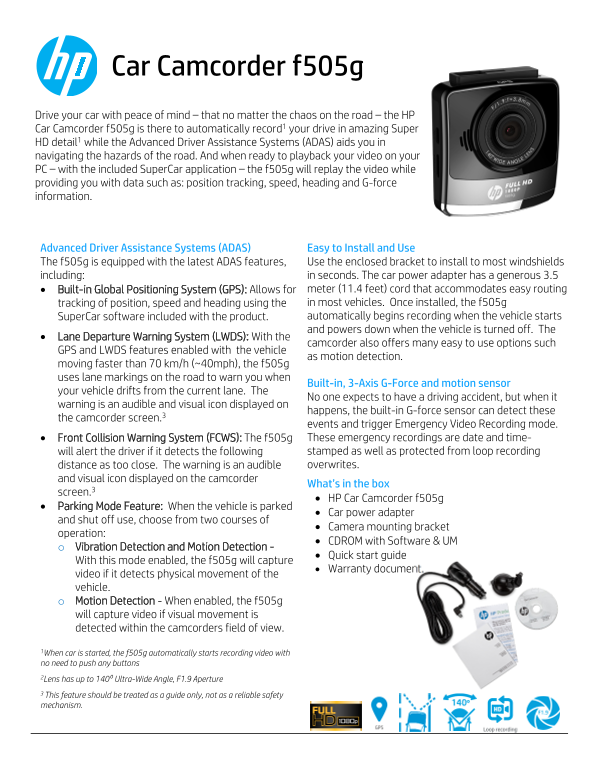
Page 1 Text Content
Car Camcorder f505g Drive your car with peace of mind – that no matter the chaos on the road – the HP Car Camcorder f505g is there to automatically record1 your drive in amazing Super
HD detail1 while the Advanced Driver Assistance Systems (ADAS) aids you in navigating the hazards of the road. And when ready to playback your video on your PC – with the included Super Car application – the f505g will replay the video while providing you with data such as: position tracking, speed, heading and G-force information.
Advanced Driver Assistance Systems (ADAS) Easy to Install and Use The f505g is equipped with the latest ADAS features, Use the enclosed bracket to install to most windshields including: in seconds. The car power adapter has a generous 3.5 Built-in Global Positioning System (GPS): Allows for meter (11.4 feet) cord that accommodates easy routing tracking of position, speed and heading using the in most vehicles. Once installed, the f505g Super Car software included with the product. automatically begins recording when the vehicle starts and powers down when the vehicle is turned off. The
Lane Departure Warning System (LWDS): With the
camcorder also offers many easy to use options such
GPS and LWDS features enabled with the vehicle
as motion detection.
moving faster than 70 km/h (~40mph), the f505g uses lane markings on the road to warn you when
Built-in, 3-Axis G-Force and motion sensor
your vehicle drifts from the current lane. The
No one expects to have a driving accident, but when it
warning is an audible and visual icon displayed on
happens, the built-in G-force sensor can detect these
the camcorder screen.3
events and trigger Emergency Video Recording mode. Front Collision Warning System (FCWS): The f505g These emergency recordings are date and time- will alert the driver if it detects the following stamped as well as protected from loop recording distance as too close. The warning is an audible overwrites.
and visual icon displayed on the camcorder
What’s in the box
screen.3
HP Car Camcorder f505g
Parking Mode Feature: When the vehicle is parked
Car power adapter
and shut off use, choose from two courses of
Camera mounting bracket
operation:
CDROM with Software & UM
o Vibration Detection and Motion Detection -
Quick start guide
With this mode enabled, the f505g will capture
Warranty document.
video if it detects physical movement of the vehicle. o Motion Detection - When enabled, the f505g will capture video if visual movement is detected within the camcorders field of view.
1When car is started, the f505g automatically starts recording video with
no need to push any buttons 2Lens has up to 1400 Ultra-Wide Angle, F1.9 Aperture
3 This feature should be treated as a guide only, not as a reliable safety
mechanism.
Page Summary Contents For HP f505g Car dashcam Product Information
Manual Details
| Brand | HP |
|---|---|
| Pages | 2 |
| File Size | 311.85 KB |
| Published | May 31, 2026 |
Enter the captcha to get the download link:

Frequently Asked Questions
How is the f505g camcorder installed?
Use the enclosed bracket to install it onto most windshields in seconds.
What safety systems are available for road hazards?
It includes Lane Departure Warning System (LWDS), Front Collision Warning System (FCWS), and a 3-Axis G-Force sensor.
Can I use the camcorder when my car is parked?
Yes, enable Parking Mode to capture video if physical vibration or visual motion is detected.
What type of memory card should I use for recording?
Class 10 speed SDHC cards or greater are required for HD video recording.