Page 1
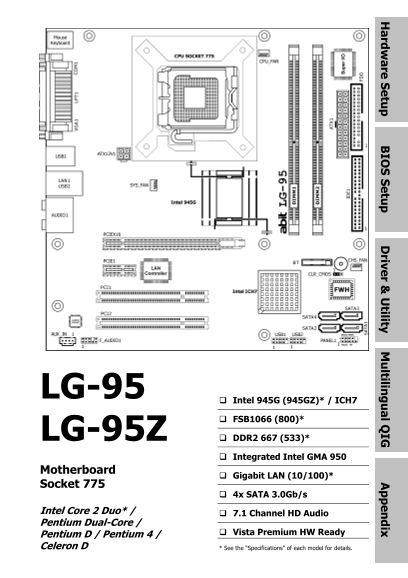
rd re tu IO tu riv r & tility ltilin l Q IG ix LG-95 Intel 945G (945GZ)* / ICH7 FSB1066 (800)* LG-95Z DDR2 667 (533)* Integrated Intel GMA 950 Motherboard Gigabit LAN (10/100)* Socket 775 4x SATA ...
Page 2
LG-95/LG-95Z User’s Manual English + Multilingual QIG 1st Edition, December 2006 Copyright and Warranty Notice The information in this document is subject to change without notice and does not represe...
Page 3
rd re tu IO tu riv r & tility ltilin l Q IG ix Contents 1. Hardware Setup 1-1 1.1 Specifications ..............................................................................1-1 1.1.1 LG-95.........
Page 4
5. Appendix 5-1 5.1 Troubleshooting (How to Get Technical Support?)..........................5-1 5.1.1 Q & A.................................................................................5-1 5.1...
Page 5
rd re tu 1. Hardware Setup 1.1 Specifications 1.1.1 LG-95 CPU Expansion Slots • LGA775 socket for Intel Core 2 Duo / • 1x PCI-E X16 slot Pentium Dual-Core / Pentium D / • 1x PCI-E X1 slot Pentium 4 / ...
Page 6
1.1.2 LG-95Z CPU Expansion Slots • LGA775 socket for Intel • 1x PCI-E X1 slot Pentium Dual-Core / Pentium D / • 2x PCI slots Pentium 4 / Celeron D processor with 800MHz FSB Internal I/O Connectors • S...
Page 7
rd re tu 1.2 Motherboard Layout 1.2.1 LG-95 LG-95/LG-95Z 1-3
Page 8
1.2.2 LG-95Z 1-4 LG-95/LG-95Z
Page 9
rd re tu 1.3 Choosing a Computer Chassis The motherboard and its component layouts illustrated in this chapter were based mainly on model “LG-95”, unless specifically stated. • Choose a chassis big en...
Page 10
1.5 Checking Jumper Settings • For a 2-pin jumper, plug the jumper cap on both pins will make it CLOSE (SHORT). Remove the jumper cap, or plug it on either pin (reserved for future use) will leave it ...
Page 11
rd re tu CMOS Backup Battery: An onboard battery saves the CMOS memory to keep the BIOS information stays on even after disconnected your system with power source. Nevertheless, this backup battery ex...
Page 12
1.6 Connecting Chassis Components 1.6.1 ATX Power Connectors These connectors provide the connection from an ATX power supply. As the plugs from the power supply fit in only one orientation, find the ...
Page 13
rd re tu 1.6.2 Front Panel Switches & Indicators Headers This header is used for connecting switches and LED indicators on the chassis front panel. Watch the power LED pin position and orientation...
Page 14
1.6.3 FAN Power Connectors These connectors each provide power to the cooling fans installed in your system. • CPU_FAN: CPU Fan Power Connector • SYS_FAN: System Fan Power Connector • CHS_FAN: Chassis...
Page 15
rd re tu 1.7 Installing Hardware ※ DO NOT scratch the motherboard when installing hardware. An accidentally scratch of a tiny surface-mount component may seriously damage the motherboard. ※ In order t...
Page 16
5. Use your left hand to hold the load plate, 8. Place the heatsink and fan assembly onto and use your right thumb to peel the cap off. the socket. Align the four fasteners toward the four mounting ho...
Page 17
rd re tu 1.7.2 DDR2/DDR Memory Slots This motherboard supports two DDR or two DDR2 DIMMs. Note that DDR & DDR2 cannot be both applied at the same time. Apply either DDR or DDR2 memory modules only...
Page 18
1.8 Connecting Peripheral Devices 1.8.1 Floppy and IDE Disk Drive Connectors The FDC1 connector connects up to two floppy drives with a 34-wire, 2-connector floppy cable. Connect the single end at the...
Page 19
rd re tu 1.8.2 Serial ATA Connectors Each SATA connector serves as one single channel to connect one SATA device by SATA cable. To connect SATA device: 1. Attach either end of the signal cable to the ...
Page 20
1.8.3 Additional USB 2.0 Port Headers Each header supports 2x additional USB 2.0 ports by connecting bracket or cable to the rear I/O panel or the front-mounted USB ports of your chassis. Pin Pin Assi...
Page 21
rd re tu 1.8.5 Front Panel Audio Connection Header This header provides the connection to audio connector at front panel. Pin Signal Name 1 PORT1 L 2 GND 3 PORT1 R 4 PRESENCE# 5 PORT2 R 6 SENSE1_RETUR...
Page 22
1.8.6 PCI and PCI Express X16, X1 Slots Install PCI Express X16 graphics card into slot “PCIEX16”. (For LG-95 only) Install PCI Express X1 card into slot “PCIEX1”. Install PCI cards into slots “PCI1” ...
Page 23
rd re tu 1.9 Connecting Rear Panel I/O Devices The rear I/O part of this motherboard provides the following I/O ports: • Mouse: Connects to PS/2 mouse. • Keyboard: Connects to PS/2 keyboard. • LPT1: C...
Page 24
1-20 LG-95/LG-95Z
Page 25
IO tu 2. BIOS Setup This motherboard provides a programmable EEPROM so that you can update the BIOS utility. The BIOS (Basic Input/Output System) is a program that deals with the basic level of commun...
Page 26
2-2 LG-95/LG-95Z
Page 27
riv r & tility 3. Driver & Utility The “Driver & Utility CD” that came packed with this motherboard contains drivers, utilities and software applications required for its basic and advance...
Page 28
3-2 LG-95/LG-95Z
Page 29
ltilin l Q IG 4. Multilingual Quick Installation Guide 4.1 繁體中文 4.1.1 規格(LG-95) 處理器 擴充插槽 • 支援具備 1066MHz前端匯流排的 Intel • 1個 PCI-E X16插槽 Core 2 Duo / Pentium Dual-Core / • 1個 PCI-E X1插槽 Pentium D / Pentiu...
Page 30
4.1.2 規格(LG-95Z) 處理器 擴充插槽 • 支援具備 800MHz前端匯流排的 Intel • 1個 PCI-E X1插槽 Pentium Dual-Core / Pentium D / • 2個 PCI插槽 Pentium 4 / Celeron D處理器 • 支援 Intel Hyper-Threading技術 • 1個 Ultra ATA 100 IDE接頭 • Intel 94...
Page 31
ltilin l Q IG 本「快速安裝略說」僅包含安裝 abit 主機板時所需的 前面板音效接頭:[FP-AUDIO1] 基本硬體資訊。詳細的操作方式,仍請參閱完整的手 本接頭提供前面板 HD (高品質) 音效連接。 附加的 USB 連接埠接頭:[FP-USB1]、[FP-USB2] 除了位於 I/O 面板上的內建 USB 接頭外,您可透過帶有支架的 • 安裝機板或變換任何設定之前,請先關閉電源...
Page 32
4.2 简体中文 4.2.1 规格(LG-95) 处理器 扩充插槽 • 支持具备 1066MHz前端总线的 Intel • 1个 PCI-E X16插槽 Core 2 Duo / Pentium Dual-Core / • 1个 PCI-E X1插槽 Pentium D / Pentium 4 / Celeron D处理 • 2个 PCI插槽 • 支持 Intel 超线程技术 内部输入/输出接头 ...
Page 33
ltilin l Q IG 4.2.2 规格(LG-95Z) 处理器 扩充插槽 • 支持具备 800MHz前端总线的 Intel • 1个 PCI-E X1插槽 Pentium Dual-Core / Pentium D / • 2个 PCI插槽 Pentium 4 / Celeron D处理器 • 支持 Intel 超线程技术 • 1个 Ultra ATA 100 IDE接头 • Intel 9...
Page 34
4.2.3 快速安装略说 本“快速安装略说”仅包含基本的硬件信息, 前面板音频接头:[FP-AUDIO1] 供您在安装 abit主板时进行参考。如需了解高 本接头提供前面板 HD (高品质) 音效连接。 级操作,仍请参阅其详细指南。 附加的 USB端口接头:[FP-USB1]、[FP-USB2] 除了位于 I/O面板上的板载 USB连接器外,这些接头可以通过 带线卡的延长电缆分别提供两个附加的 U...
Page 35
5. Appendix 5.1 Troubleshooting (How to Get Technical Support?) 5.1.1 Q & A Q: Do I need to clear the CMOS before I use a new motherboard to assemble my new computer system? A: Yes, we highly reco...
Page 36
Q: How to get a quick response for my request on technical support? A: Please carry out a simple troubleshooting before sending “Technical Support Form”: System boot-up fails after the system had been...
Page 37
• Memory configuration: Type in the memory configuration in BIOS setting. Example: Memory Timing: 2.5-3-3-7 @533MHz • Graphics information: Note Graphics card’s brand, model and driver version • Graph...
Page 38
5.1.2 Technical Support Form Region: E-mail: First name: Last Name: Subject: Motherboard: BIOS Version: Memory brand: Memory size: Memory configuration: Graphics card: Graphics driver version: Power s...
Page 39
5.1.3 Contact Information Taiwan Head Office Austria, Czech, Romania, Bulgaria, Slovakia, Croatia, Bosnia, Serbia, Universal ABIT Co., Ltd. Macedonia, Slovenia No. 323, Yang Guang St., Neihu, Taipei, ...
Page 40
http://www.abit.com.tw P/N: 4310-0000-57 Rev. 1.00