Dell Vostro 3250 Quick User Guide
Summary
Dell Vostro 3250 Quick Start Guide with multilingual setup covering keyboard/mouse and optional network cable connection, display connection (noting discrete graphics card port usage), power cable activation, Windows 10 setup completion, Microsoft account sign-in, Enable Support and Protection activation, and features including optical drive, expansion slots, USB 3.0 connectors, and chassis intrusion switch.
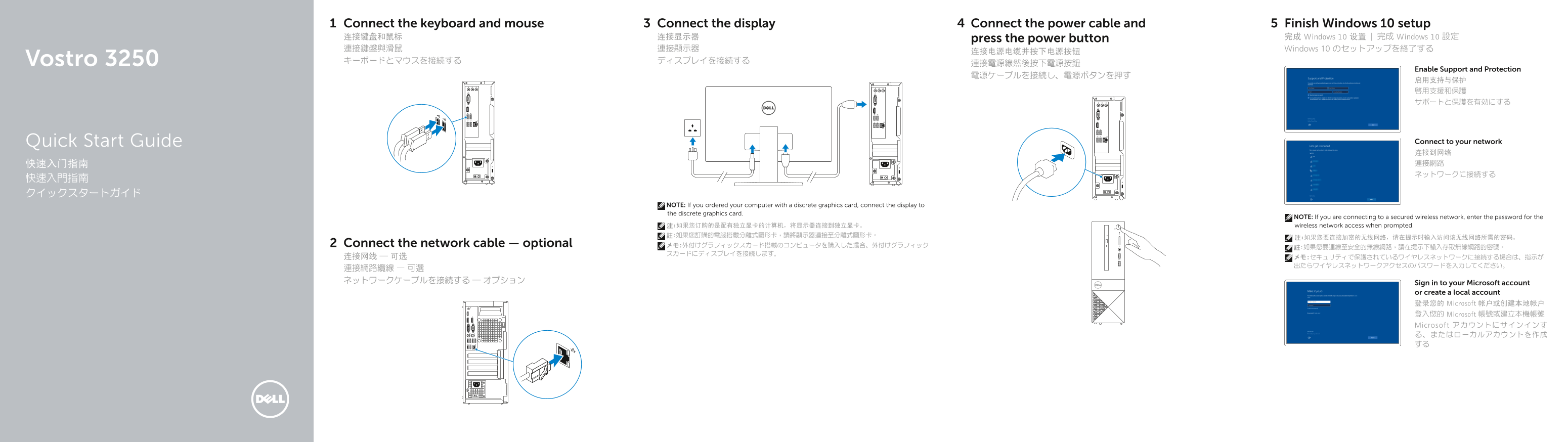
Page 1 Text Content
Connect the keyboard and mouse Connect the display Connect the power cable and Finish Windows 10 setup 连接键盘和鼠标 连接显示器 press the power button 完成 Windows 10 设置 | 完成 Windows 10 設定 連接鍵盤與滑鼠 連接顯示器 Windows 10 のセットアップを終了する
Vostro 3250 キーボードとマウスを接続する ディスプレイを接続する
Enable Support and Protection
Quick Start Guide Connect to your network 连接到网络 快速入门指南 連接網路 ネットワークに接続する
NOTE: If you ordered your computer with a discrete graphics card, connect the display to the discrete graphics card.
NOTE: If you are connecting to a secured wireless network, enter the password for the 注:如果您订购的是配有独立显卡的计算机,将显示器连接到独立显卡。 wireless network access when prompted.
Connect the network cable — optional メモ:外付けグラフィックスカード搭載のコンピュータを購入した場合、外付けグラフィック
Sign in to your Microsoft account or create a local account 登录您的 Microsoft 帐户或创建本地帐户 登入您的 Microsoft 帳號或建立本機帳號 Microsoft アカウントにサインインす る、またはローカルアカウントを作成 する
Page Summary Contents For Dell Vostro 3250 Quick User Guide
Manual Details
| Brand | Dell |
|---|---|
| Pages | 2 |
| File Size | 551.84 KB |
| Published | July 03, 2026 |
Enter the captcha to get the download link:

Frequently Asked Questions
我应该将显示器连接到哪个接口?
如果您订购的是配有独立显卡的计算机,请将显示器连接到独立显卡。
如果我在安全的无线网络环境下,启动设备需要做什么操作?
您需要在提示时输入访问该无线网络所需的密码。
哪些接口用于扩展功能或外接设备?
包括 VGA 接口、HDMI 接口、USB 2.0 和 USB 3.0 连接器等多个端口。
如何了解电脑的硬件状态和兼容性信息?
可以通过查找 Dell apps 或访问 Dell.com/support/manuals 来获取产品支持和手册。