Dell Inspiron 15 7557 Quick User Guide
Summary
This quick start guide provides initial setup for the Dell Inspiron 15 7000 Series laptop. Covers power connection, Windows and Ubuntu setup, Dell application location, device registration, and network connection. Includes visual diagram of ports and indicators. Covers SupportAssist and Dell Backup applications. Intended for first-time users and gamers configuring their new Inspiron 7000 Series laptop.
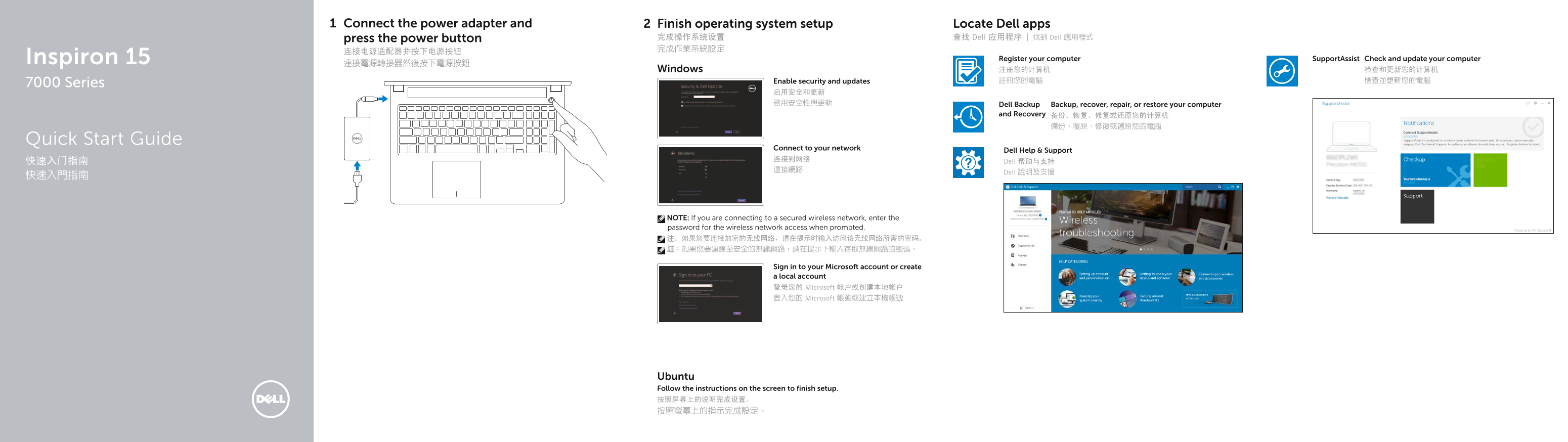
Page 1 Text Content
Connect the power adapter and Finish operating system setup Locate Dell apps
press the power button 完成操作系统设置 查找 Dell 应用程序 | 找到 Dell 應用程式 完成作業系統設定
Inspiron 15 Register your computer Support Assist Check and update your computer
Windows 注册您的计算机 检查和更新您的计算机 Enable security and updates 註冊您的電腦 檢查並更新您的電腦
7000 Series
启用安全和更新 啟用安全性與更新 Dell Backup Backup, recover, repair, or restore your computer
and Recovery 备份、恢复、修复或还原您的计算机
Quick Start Guide
Connect to your network
Dell Help & Support
快速入门指南 Dell 帮助与支持
Dell 說明及支援
NOTE: If you are connecting to a secured wireless network, enter the password for the wireless network access when prompted. 注:如果您要连接加密的无线网络,请在提示时输入访问该无线网络所需的密码。 註:如果您要連線至安全的無線網路,請在提示下輸入存取無線網路的密碼。
Sign in to your Microsoft account or create a local account 登录您的 Microsoft 帐户或创建本地帐户 登入您的 Microsoft 帳號或建立本機帳號
Ubuntu Follow the instructions on the screen to finish setup. 按照屏幕上的说明完成设置。 按照螢幕上的指示完成設定。
Page Summary Contents For Dell Inspiron 15 7557 Quick User Guide
Manual Details
| Brand | Dell |
|---|---|
| Pages | 2 |
| File Size | 683.93 KB |
| Published | June 26, 2026 |
Enter the captcha to get the download link:

Frequently Asked Questions
Are there multiple USB ports available?
Yes, the manual specifies two separate USB 3.0 ports (numbered 6) and another set of two (numbered 12), with one having PowerShare capability.
How do I connect an external monitor?
You can use either the dedicated HDMI port (13) or potentially connect via one of the USB 3.0 ports depending on your specific setup, as the manual includes a 'Switch to external display' function description.
What is required for basic setup and restoration?
The process involves connecting the power adapter, pressing the power button, and following prompts to register or complete operating system setups (e.g., Windows activation, Ubuntu instructions).
Where can I find safety and regulatory information?
Regulatory and safety details are available on Dell's website at Dell.com/regulatory_compliance.