Dell Inspiron 15 5545 Quick Start Guide - Windows 8
Summary
Dell Inspiron 15 5000 Series Quick Start Guide with shortcut keys overview (playback controls, brightness, volume, wireless, external display, keyboard backlight, Fn-key lock), Windows setup steps, Dell Backup and Recovery, and features including camera, USB 3.0, HDMI, and media card reader.
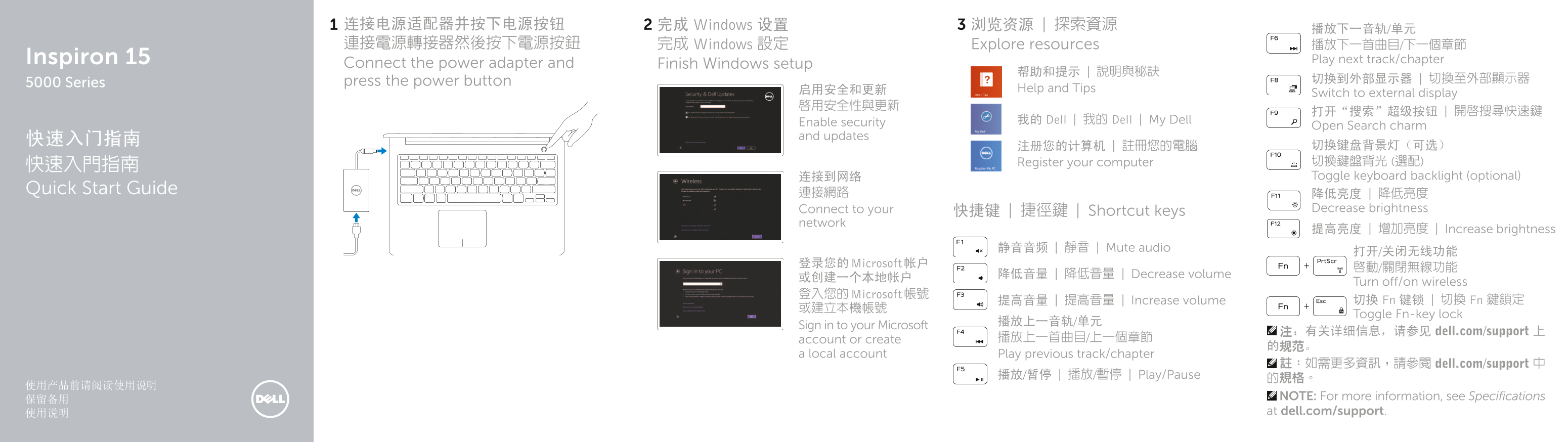
Page 1 Text Content
连接电源适配器并按下电源按钮 完成 Windows 设置 浏览资源 | 探索資源
連接電源轉接器然後按下電源按鈕 完成 Windows 設定 Explore resources 播放下一首曲目/下一個章節
Inspiron 15 Play next track/chapter
Connect the power adapter and Finish Windows setup
press the power button 切换到外部显示器 | 切換至外部顯示器
5000 Series
启用安全和更新 Help and Tips
Switch to external display
Enable security 我的 Dell | 我的 Dell | My Dell
Open Search charm
and updates
注册您的计算机 | 註冊您的電腦 切换键盘背景灯(可选) Register your computer 切換鍵盤背光 (選配)
连接到网络 Toggle keyboard backlight (optional)
Quick Start Guide 連接網路
降低亮度 | 降低亮度 Connect to your 快捷键 | 捷徑鍵 | Shortcut keys Decrease brightness
network
提高亮度 | 增加亮度 | Increase brightness
静音音频 | 靜音 | Mute audio
登录您的 Microsoft 帐户
降低音量 | 降低音量 | Decrease volume
Turn off/on wireless
登入您的 Microsoft 帳號
提高音量 | 提高音量 | Increase volume 切换 Fn 键锁 | 切換 Fn 鍵鎖定
Toggle Fn-key lock
Sign in to your Microsoft
注:有关详细信息,请参见 dell.com/support 上
account or create 播放上一首曲目/上一個章節
a local account Play previous track/chapter
註:如需更多資訊,請參閱 dell.com/support 中
播放/暂停 | 播放/暫停 | Play/Pause
的規格。 NOTE: For more information, see Specifications at dell.com/support.
Page Summary Contents For Dell Inspiron 15 5545 Quick Start Guide - Windows 8
Manual Details
| Brand | Dell |
|---|---|
| Pages | 2 |
| File Size | 270.71 KB |
| Published | July 03, 2026 |
Enter the captcha to get the download link:

Frequently Asked Questions
如何连接外部显示器?
您可以通过按下电源按钮、完成Windows设置等步骤进行控制和设置。
该设备有哪些常用的输入端口?
它包括USB 3.0端口(2个)、HDMI端口以及耳机连接埠。
需要了解哪些信息以获取详细规格或支持?
有关更多详细信息,请查阅dell.com/support。
如何管理设备的音频输出和输入?
可以使用“降低音量”、“提高音量”或直接切换静音(Mute)来控制音频功能。