Casio VX-100 Android EPOS Terminal User Guide
Summary
The Casio VX-100 is a versatile, Android-powered Point of Sale (EPOS) terminal designed for modern retail environments. This robust, all-in-one system features an integrated 10.4-inch touchscreen display and built-in receipt printer, ensuring fast, reliable checkout service. Ideal for independent stores, restaurants, and national chains, the system offers excellent low power consumption and versatile connectivity (LAN/USB). The accompanying documentation details its straightforward setup, extensive customization options, and platform compatibility for integrating advanced business applications like loyalty programs and inventory management.
Page 1 Text Content
Casio VX-100 Android EPOS Terminal
The Casio VX-100 runs the Android TM operating system on a smartly engineered, all-in-one hardware platform, designed for a wide selection of retail settings.
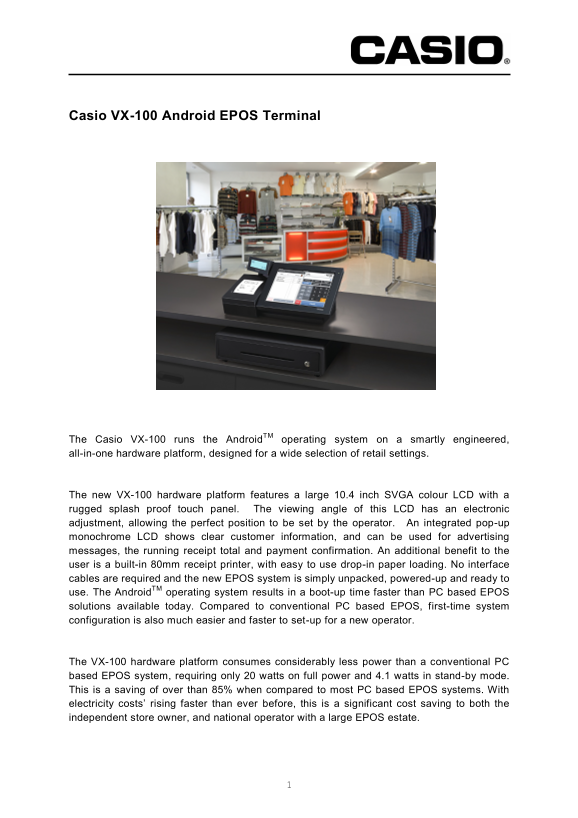
The new VX-100 hardware platform features a large 10.4 inch SVGA colour LCD with a rugged splash proof touch panel. The viewing angle of this LCD has an electronic adjustment, allowing the perfect position to be set by the operator. An integrated pop-up monochrome LCD shows clear customer information, and can be used for advertising messages, the running receipt total and payment confirmation. An additional benefit to the user is a built-in 80mm receipt printer, with easy to use drop-in paper loading. No interface cables are required and the new EPOS system is simply unpacked, powered-up and ready to use. The Android TM operating system results in a boot-up time faster than PC based EPOS solutions available today. Compared to conventional PC based EPOS, first-time system configuration is also much easier and faster to set-up for a new operator.
The VX-100 hardware platform consumes considerably less power than a conventional PC based EPOS system, requiring only 20 watts on full power and 4.1 watts in stand-by mode. This is a saving of over than 85% when compared to most PC based EPOS systems. With electricity costs’ rising faster than ever before, this is a significant cost saving to both the independent store owner, and national operator with a large EPOS estate.
Page Summary Contents For Casio VX-100 Android EPOS Terminal User Guide
Manual Details
| Brand | Android |
|---|---|
| Pages | 3 |
| File Size | 908.99 KB |
| Published | May 14, 2026 |
Enter the captcha to get the download link:

Frequently Asked Questions
How difficult is it to set up for a new operator?
The first-time system configuration is much easier and faster than conventional PC based EPOS solutions.
What power savings can I expect compared to PC based systems?
It consumes considerably less power, requiring only 20 watts on full power, a saving of over 85% compared to most PC based EPOS systems.
Does the terminal support cash and networking?
Yes. It includes two cash drawer ports, LAN/Ethernet, and a USB interface for connectivity.
What is the main display specification?
It features a large 10.4 inch SVGA colour LCD with a touch panel (800 x 600 dots).
Where can I use this system?
It is designed for a wide range of environments, including independent stores, national chains, restaurants, and offices.