Casio 2568 User Guide
Summary
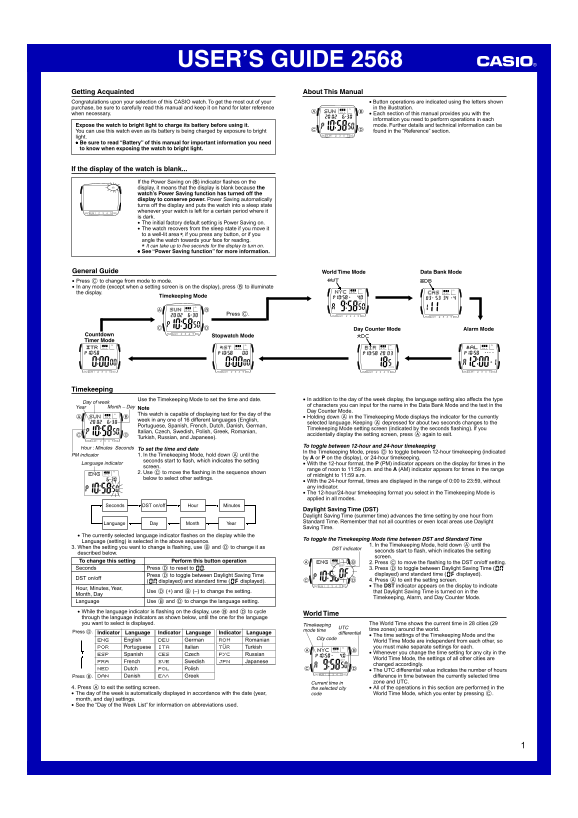
Discover the full potential of your multi-functional CASIO watch. This comprehensive guide provides essential instructions for every feature, including World Time Mode, Stopwatch, Alarm, Timer, and Day Counter. Learn how to accurately set time and date across any time zone, select from 16 international languages, toggle between 12/24 hours, and manage Daylight Saving Time settings. This manual is perfect for new owners who want a deep understanding of the watch’s advanced operations and power-saving features.
Manual Details
| Brand | Casio |
|---|---|
| Pages | 5 |
| File Size | 399.23 KB |
| Published | June 05, 2026 |
Enter the captcha to get the download link:

Frequently Asked Questions
What should I do if the watch display is blank?
Expose the watch to bright light to charge its battery before use.
How does Power Saving function work?
It automatically turns off the screen when left in the dark for a period, entering a sleep state. The watch wakes up if moved to light or pressed.
What steps are needed to set Daylight Saving Time (DST)?
Press C to select DST on/off. Press D to toggle between ON and OFF, then press A to save/exit.
How can I change the time from 12-hour to 24-hour format?
In Timekeeping Mode, hold down A until seconds flash; then use C to cycle through formats, or press A again after selecting your preference.