Canon PIXMA MP Series PIXMA MP610/MP610 series Quick Installation Guide
Summary
The essential guide for setting up and operating your Canon MP-101TM device. This comprehensive quick start manual is designed for new users needing clear, step-by-step instructions. It thoroughly covers everything from initial hardware setup and connecting to Windows systems to understanding core operational functions and effective troubleshooting tips, ensuring a smooth and immediate experience with your new printing unit.
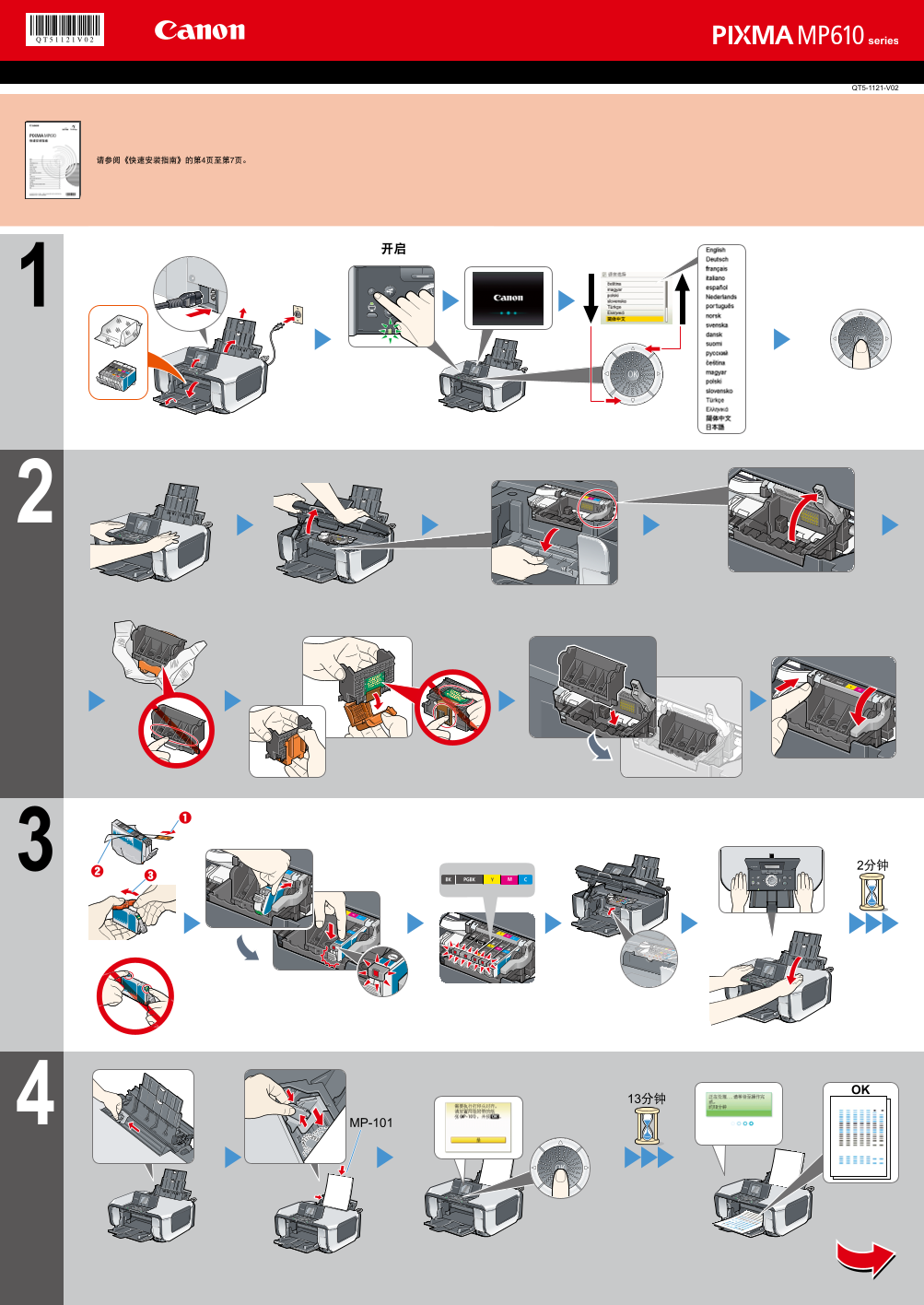
Page 1 Text Content
QT5-1121-V02
Refer to pages 2 and 3 of the Quick Start Guide. Refer to pages 2 and 3 of the Quick Start Guide. Refer to pages 2 and 3 of the Quick Start Guide. Refer to pages 2 and 3 of the Quick Start Guide. Refer to pages 2 and 3 of the Quick Start Guide. Refer to pages 2 and 3 of the Quick Start Guide. Refer to pages 2 and 3 of the Quick Start Guide. Refer to pages 2 and 3 of the Quick Start Guide. Refer to pages 2 and 3 of the Quick Start Guide. Refer to pages 2 and 3 of the Quick Start Guide. Refer to pages 2 and 3 of the Quick Start Guide. Refer to pages 2 and 3 of the Quick Start Guide. 请参阅《快速安装指南》的第4页至第7页。 Refer to pages 2 and 3 of the Quick Start Guide. Refer to pages 2 and 3 of the Quick Start Guide. Refer to pages 2 and 3 of the Quick Start Guide. Refer to pages 2 and 3 of the Quick Start Guide. Refer to pages 2 and 3 of the Quick Start Guide. Refer to pages 2 and 3 of the Quick Start Guide. Refer to pages 2 and 3 of the Quick Start Guide. Refer to pages 2 and 3 of the Quick Start Guide. Refer to pages 2 and 3 of the Quick Start Guide. Refer to pages 2 and 3 of the Quick Start Guide. Refer to pages 2 and 3 of the Quick Start Guide. Refer to pages 2 and 3 of the Quick Start Guide.
MP-101
Page Summary Contents For Canon PIXMA MP Series PIXMA MP610/MP610 series Quick Installation Guide
Manual Details
| Brand | Canon |
|---|---|
| Pages | 2 |
| File Size | 6.81 MB |
| Published | May 17, 2026 |
Enter the captcha to get the download link:

Frequently Asked Questions
What is the reference model number provided?
The unit models referenced are QT5-1121-V02 and MP-101TM.
Where should I look for basic setup information?
Please consult pages 2 and 3 of the Quick Start Guide, or pages 4 through 7 in local documentation.
What operating system is compatible with this device?
Compatibility is confirmed for Windows Vista TM.