Acer Projector Accessories Ceiling Mount (CM-01S) User's Manual
Summary
Secure your projector with this Universal Ceiling Mount, providing stable support and versatile placement for various models. This guide details every step of installation, covering everything from securing the base to connecting specialized brackets for optimal positioning and heat dissipation. It is perfect for DIY enthusiasts or professional installers looking to achieve a robust, customized, and safe permanent ceiling mount solution for their home theater equipment.
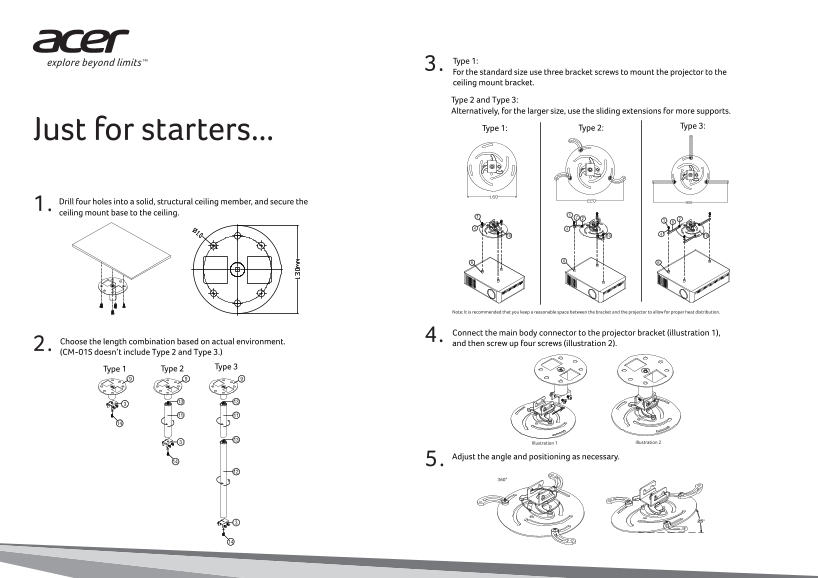
Page 1 Text Content
Type 1: 3. For the standard size use three bracket screws to mount the projector to the ceiling mount bracket. Type 2 and Type 3: Alternatively, for the larger size, use the sliding extensions for more supports.
Type 2: Type 3: Type 1:
Just for starters... Drill four holes into a solid, structural ceiling member, and secure the 1. ceiling mount base to the ceiling.
Note: It is recommended that you keep a reasonable space between the bracket and the projector to allow for proper heat distribution.
Connect the main body connector to the projector bracket (illustration 1), 4.
Choose the length combination based on actual environment. and then screw up four screws (illustration 2). 2. (CM-01S doesn’t include Type 2 and Type 3.)
Type 2 Type 3 Type 1
Illustration 1 Illustration 2
Adjust the angle and positioning as necessary. 5. 360°
Page Summary Contents For Acer Projector Accessories Ceiling Mount (CM-01S) User's Manual
Manual Details
| Brand | Acer |
|---|---|
| Pages | 2 |
| File Size | 1.12 MB |
| Published | June 05, 2026 |
Enter the captcha to get the download link:

Frequently Asked Questions
What are the recommended installation steps for the ceiling mount?
Drill four holes into a solid, structural ceiling member, secure the base, connect the main body connector, and then use four screws to attach it upright.
How do I ensure proper heat distribution when mounting the projector?
It is recommended that you keep a reasonable space between the bracket and the projector using the Heat Buffer Piece (Item 6).
What weight capacity does this ceiling mount system support?
This ceiling mounting can sustain a projector up to 20 kg weight.
Is the height of the common model fixed or adjustable?
The length of CM-01S is 11cm, while CM-02S is adjustable from 11cm to 64cm.